Best App to Split Bills With Roommates: Top 6 for 2026
Find the best app to split bills with roommates in 2026. Compare prices, recurring bill support, and which app pays the bill so nobody has to front it.

Asking your roommates for $25 each shouldn’t take three drafts, but here you are. “Hey, the internet was $75 this month; whenever you get a chance!”
“Whenever” is starting to feel long, since you paid that bill on the 5th and it’s now the 18th.
Most bill-splitting apps make that message easier to send. They track who paid and send the reminder for you, while one roommate’s card still covers the bill first.
We think the best app to split bills with roommates should pay the bill from money everyone has already put in, so that’s how we built Pool. It’s the only one of the six apps we compared that collects each share before the due date.
Key Takeaways
- Trackers record a bill after someone pays it. Splitwise, Venmo, Settle Up, Tricount, and SplitMyExpenses all handle the math well, but often one roommate still covers rent or the electric bill first and waits to be paid back.
- A Pool pays the bill from money that's already in it. Each roommate sets a recurring deposit, and the apartment's bills come out of the Pool's own balance, so nobody fronts anything or settles up at the end of the month.
- Check recurring bill support before price. Splitwise schedules recurring expenses on its free plan, while Settle Up keeps them behind a $3.99 monthly Premium plan, and Tricount doesn't offer them.
- Uneven rooms are easy to handle. Trackers split by percentage or shares, and in a Pool each roommate sets a deposit that matches their part of the rent.
- The odd takeout order doesn't need a Pool. For costs that don't come back every month, the identity check every Pool member goes through is more setup than the bill deserves.
Quick verdict: Pool is the best app to split bills with roommates who share the same costs every month.
Each roommate pays into the apartment's Pool on a schedule and rent, utilities, and household buys come straight out of its balance.
Trackers like Splitwise and Tricount record who owes what after one person pays, which works well for an occasional dinner or takeout order.
The Best Apps to Split Bills With Roommates, Side by Side
Prices come from each app's own site or the US App Store and the last column shows whose money pays the bill on the due date.
| App | Price | Monthly bills | Who pays the bill |
|---|---|---|---|
| Pool | Free to start, no monthly fees, free debit cards | Recurring deposits fill the Pool before bills are due | The Pool, from its own balance |
| Splitwise | Free with a daily expense limit. Pro is $4.99 a month or $39.99 a year | Recurring expenses on the free plan | One roommate, until everyone settles |
| Venmo | Free from a bank account, debit card, or Venmo balance. 3% by credit card | Expenses added and split in the app | One roommate, until everyone taps Pay |
| Settle Up | Free. Premium is $3.99 a month or $19.99 a year | Recurring expenses with Premium | One roommate, until everyone settles |
| Tricount | Free, no ads | Entered each month again | One roommate, until everyone settles |
| SplitMyExpenses | Free. Premium is $3.99 a month | 10 recurring expenses free, up to 100 active with Premium | One roommate, until everyone settles |
What to Look for in an App to Split Bills With Roommates
In 2023, 6.8 million US households included unrelated roommates, housemates, or boarders, according to NAHB’s analysis of Census data. For people sharing a home, splitting costs isn’t a one-time task: rent, utilities, and other bills come back month after month.
- Bills that repeat. Rent, internet, and streaming come back every month. An app that schedules them saves someone from entering the same $75 internet bill twelve times a year.
- Uneven shares. If one roommate has the bigger room or a private bathroom, the app should split by percentage or shares so nobody runs side math every month.
- Who covers the bill on the due date. Most apps record a bill after someone pays it, so figure out whose card or checking account carries rent between the 1st and the day everyone pays back.
- An app everyone will open. It only works if every roommate pays in or logs their share on time, and Android support plus a free plan make that easier for the person who rarely opens apps.
- The cost over a lease. A $3.99 monthly upgrade comes to $47.88 over a 12-month lease, so check what the free plan leaves out before anyone subscribes.
The Top 6 Apps to Split Bills With Roommates, Ranked
1. Best for Rent and Monthly Bills
Pool
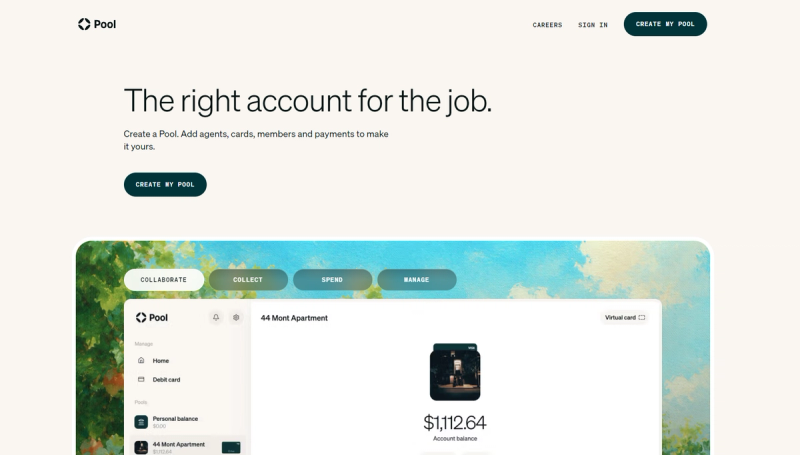
A Pool is a financial account with its own purpose, so your apartment's bills get a balance of their own instead of a running list of who owes whom.
Each roommate sets a recurring deposit, and the money for rent and utilities lands before anything is due. Rent and autopay bills go out with the Pool's account and routing numbers, so nobody's personal checking account carries the full amount.
Every member gets a free Pool Visa debit card that works with any Pool where they're an Owner, Admin or Spender, and it spends right from the Pool's shared balance.
The dish soap and the new shower curtain get paid without anyone logging an expense afterward, because every purchase shows up in the activity feed.
You can open as many Pools as you need, so rent can sit apart from the money for roommate expenses like utilities and groceries.
Our founders came from Cash App and Snap and ran Braid, a similar product, from 2019 to 2023. Braid grew past 100,000 pools, with millions of dollars in payments moving through them each month.
Good fit for: Roommates who share rent, utilities, and household costs every month and want the money in place before the bills hit.
Falls short when: You need it set up tonight, or someone pays in another currency. A Pool holds everyone's share before the due date, but every member verifies their identity when they join, and a Pool is a US dollar account.
Price: It's free to start a Pool, invite people, fund your Pool, and use virtual and physical debit cards. There are no mandatory monthly fees or minimum balance, and fees apply only to opt-in transactions such as Instant Transfers.
2. Best for Tracking Running Balances
Splitwise

Splitwise is the app most roommates have heard of and it earns that reputation. It keeps a running balance of who owes whom and simplifies debts, so the apartment settles up in fewer payments.
You can split any expense equally or by percentage, shares, or exact amounts, and recurring expenses repeat weekly, every two weeks, monthly, or yearly. It runs on iPhone, Android, and the web, and in the US it connects to Venmo and PayPal for settling up.
Good fit for: Apartments with lots of small, irregular costs that someone wants tracked to the cent.
Falls short when: One roommate can't float the bill. Splitwise keeps an accurate tally, but whoever paid stays out of pocket until everyone settles, and its free plan limits how many expenses you can add each day.
Price: Free, with Pro at $4.99 a month or $39.99 a year in the US App Store. Pro removes the daily limit and adds receipt scanning, currency conversion, and spending charts.
3. Best When Everyone Already Uses It
Venmo

Venmo's biggest advantage is that nobody downloads anything new. Its split feature lets any roommate add an expense, adjust each person's share, and see what everyone owes.
Venmo then works out how to settle with the fewest payments, and each person taps Pay when they're ready.
Good fit for: Roommates who already pay each other on Venmo and want the math in the same app.
Falls short when: A roommate forgets to pay. Settling up isn't automatic, so the balance stays open until each person taps Pay, and the bill itself still goes on one roommate's card or account first.
Price: Free to send from a Venmo balance, debit card, or bank account, with a 3% fee for payments made with a credit card.
4. Best for Payment Reminders
Settle Up
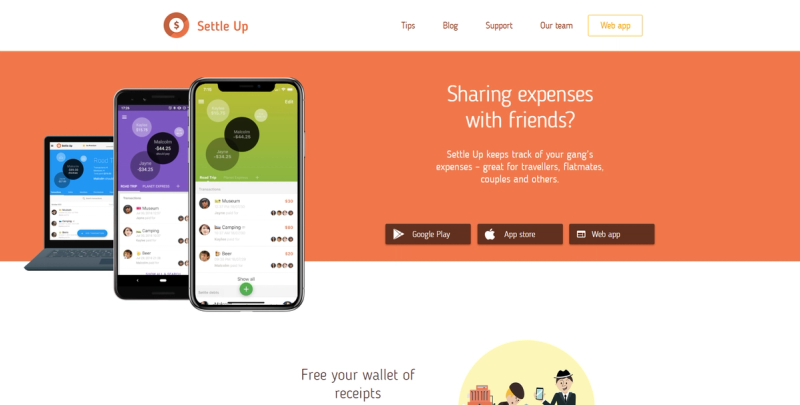
Settle Up is the tracker that does the reminding for you. It nudges roommates automatically to settle their debts, then calculates the fewest transfers needed to clear every balance.
It works offline and syncs when you're back online, supports every currency and, with Premium, adds rent, subscriptions and utility bills on a schedule.
Good fit for: Apartments where one roommate always pays late and reminders keep things moving.
Falls short when: Recurring bills are the reason you want an app. Scheduled expenses sit behind Premium, and like every tracker, it still leaves one roommate covering each bill first.
Price: Free, with Premium at $3.99 a month or $19.99 a year in the US App Store.
5. Best Free Tracker
Tricount

Tricount is the most generous free tracker of the six, with no ads and no daily expense limit. More than 20 million people use it.
You can set each person's share when an even split doesn't fit, attach receipt photos, and send payment requests. It also imports your existing Splitwise expenses, so switching doesn't mean starting the ledger over.
Good fit for: Roommates who want a free ledger with no limit on how much they log.
Falls short when: Your bills repeat every month. Tricount's features don't include recurring expenses, so someone enters rent and internet again each month, and one roommate still pays each bill first.
Price: Free, with no subscription.
6. Best for Itemized Grocery Runs
SplitMyExpenses
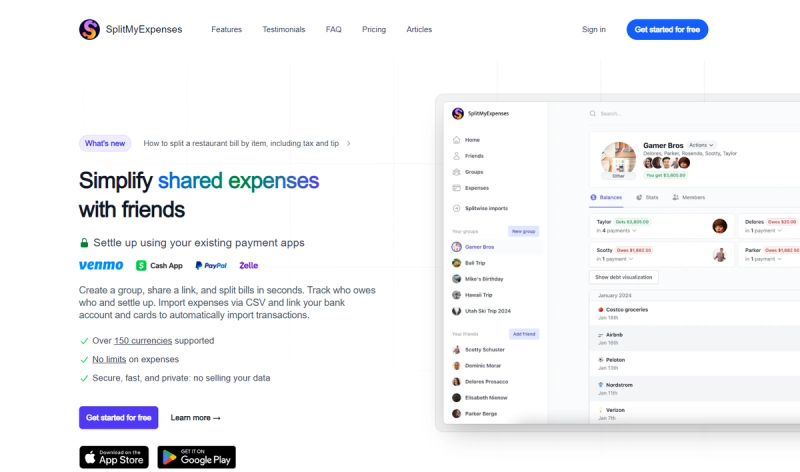
SplitMyExpenses is built for the grocery run where everyone buys different things. Its AI receipt scanning reads a photo of the receipt and itemizes it, so each roommate pays for what they put in the cart.
It splits by amount, percentage, shares, adjustments, or item, simplifies debts, and takes you straight to Venmo, PayPal, Cash App, or Zelle to pay. It works on the web, iPhone, and Android.
Good fit for: Roommates who split big grocery hauls item by item.
Falls short when: You want the headline feature for free. Receipt scanning is part of Premium, the free plan stops at 10 recurring expenses, and one roommate still fronts every bill.
Price: Free, with Premium at $3.99 a month.
One Month of Roommate Bills, Two Ways
Take three roommates, Maya, Jordan, and Sam, who share a $2,850 rent and $300 in other monthly bills. Split evenly, each of them owes $1,050 a month.
| Step | With a tracking app | With a Pool |
|---|---|---|
| Before the 1st | Roommates send their share or reimburse one another | Each roommate's $1,050 recurring deposit lands in the Pool |
| Rent, $2,850 | Maya pays it through the landlord's portal | Paid from the Pool with its account and routing numbers |
| Electric & internet, $195 | Jordan pays both on his own card | Autopay draws from the Pool's balance |
| Streaming and supplies, $105 | Sam pays both and logs them | Charged to a Pool Visa debit card |
| Expenses logged by hand | Five, unless they're set as recurring | None, since every purchase shows up in the activity feed |
| Payments to settle up | Two, $855 from Jordan and $945 from Sam, both to Maya | None |
The tracker gets every number right. After accounting for everyone’s spending, Jordan and Sam still owe Maya $1,800 until two transfers arrive, and if one of them is late, she carries it longer.
With a Pool, the money is in place when rent is due. Nobody fronts anything, and nobody owes anyone at the end of the month.
How to Set Up a Pool for Monthly Bills With Roommates
Most apartments do best with two Pools. One holds the money to split rent on the 1st, and the other covers utilities, internet, and household buys, so a grocery run never dips into rent.
- Name each Pool after the apartment. “Elm St rent” and “Elm St bills” tell every roommate exactly where their money goes.
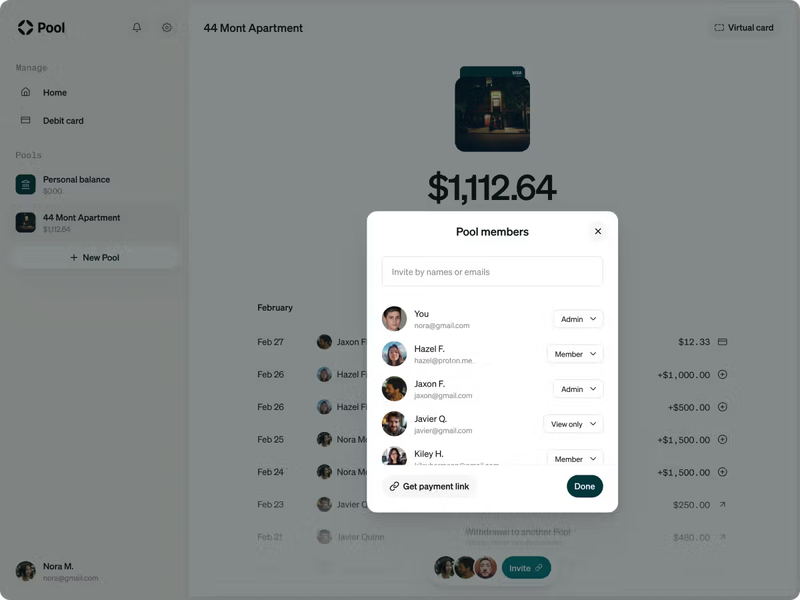
- Invite your roommates with the right role. The Owner sets it up, invites members, and assigns each a role. Admins have the same capabilities as the Owner. A Spender can add money, withdraw it, and spend with a debit card. A Viewer can only view members and transactions.
- Send invites a few days early. Every member verifies their identity when they join, which federal law requires, so give everyone time before the first bill is due.
- Set a reminder for upcoming bills. Add a reminder so everyone knows when bills are due without another round of messages in the group chat. Once you’ve established how you’re using the Pool and how much you need, they can set up recurring deposits to make contributing even easier.
- Point every bill at the Pool. Enter the Pool's account and routing numbers in the landlord's portal and each utility's autopay, and use the Pool Visa debit card for anything bought in a store or online.
When You Don't Need a Pool
If your apartment only splits the occasional takeout order, a tracking app covers it with less setup, since every Pool member goes through an identity check first.
A Pool also won't convert currencies, because every Pool is a US dollar account. And it isn't a budgeting app, so it won't build a budget from your personal spending.
Where a Pool earns its place is the money your apartment puts toward the same bills every month, like rent and the internet.
Choosing an App by How Your Apartment Shares Money
| If your apartment | What fits | Why |
|---|---|---|
| Shares rent and utilities every month | A Pool | Everyone's share lands before the 1st, so nobody fronts rent |
| Has a roommate who always pays late | A Pool with recurring deposits | They get a reminder ahead of time or they set up a deposit on schedule |
| Splits rooms unevenly | A Pool | Each roommate sets their own deposit amount |
| Buys household supplies together | A Pool | Every member gets a free Pool Visa debit card, and purchases show up in the activity feed |
| Only splits the odd takeout order | A free tracking app | Less setup than an account every member has to verify |
| Has a roommate paying in another currency | A tracker with currency conversion | Every Pool is a US dollar account |
FAQs About Apps to Split Bills With Roommates
What Is the Best App to Split Bills With Roommates?
We at Pool think the best app is the one that pays the bill from money everyone has already put in, and a Pool does that. Each roommate sets a recurring deposit, and rent, utilities, and household costs come out of the Pool's own balance.
Trackers like Splitwise and Settle Up keep an accurate tally of who owes what, but one roommate still covers each bill first.
What's the Best App to Split Monthly Bills With Roommates?
For bills that repeat, choose an app that handles the schedule for you. Splitwise adds recurring expenses on its free plan, and Settle Up does it with Premium, which saves typing but still leaves one roommate paying first.
With a Pool, the recurring part is the money itself. Each roommate's deposit arrives before the bills do, and the bills go out from the Pool's balance.
Is There a Free App to Split Bills With Roommates?
Yes. It's free to start a Pool, invite people, fund your Pool, and use virtual and physical debit cards, with no mandatory monthly fees or minimum balance. Fees apply only to opt-in transactions such as Instant Transfers.
Among trackers, Tricount is free with no ads and no daily expense limit, while the free version of Splitwise limits how many expenses you can add each day.
How Do You Split Bills When Roommates Have Different Size Rooms?
Agree on percentages before anyone moves in, along with the other ground rules for living with roommates. On a $3,000 rent, a 40% share for the main bedroom and 30% for each of the other two comes to $1,200 and $900.
In a Pool, each roommate sets a recurring deposit for their own amount. There are other ways to divide rent fairly, and you can apply the same percentages to utilities or split those evenly.
Can Roommates Split Bills Without Everyone Signing Up for an App?
Some trackers allow it. Splid needs no sign-up and works offline, and Tricount lets you try it without an account, though one person ends up keeping the list for everyone.
A Pool works differently. Because it's a financial account, every member verifies their identity when they join, which federal law requires.
Can You Split Bills With Roommates on Venmo?
Yes. Venmo's split feature lets any roommate add an expense, customize each person's share, and settle with the fewest payments.
Each person still taps Pay themselves, so the balance stays open until everyone does. The bill itself is paid by whoever covered it first, which is the step a Pool removes.
What Happens to the Bills When a Roommate Moves Out?
Settle anything they owe before their last month, and move any bill in their name to someone who's staying. In a Pool, the departing roommate cancels their recurring deposit, and you invite whoever takes the room so their deposit starts before the next due date.
Is Pool a Bank?
No. Pool is a financial technology company, not a bank. Banking services are provided by First Internet Bank, Member FDIC, and the Pool Visa debit card is issued by First Internet Bank.
Create a Pool for Your Apartment's Bills
Pick the bill that keeps landing on one roommate’s card, like rent or the internet, and give it a Pool named after your apartment.
Create your Pool, invite your roommates, and start with a reminder for a recurring expense. Once everyone is comfortable, each roommate can set up their own recurring deposit. Prefer using an agent? Connect one and use it to help manage your Pool and set up recurring deposits. See our guide here. When the due date comes, the bill is paid from the Pool’s balance and nobody is waiting on getting paid back.