Best App to Split Travel Expenses: 5 Options Compared
Not every app makes someone front the money. Compare the 5 best apps to split travel expenses on price, offline use, and currencies.

Every trip has one person who puts the rental on their card. If you're reading reviews of expense apps, it's probably you.
After the trip, there are weeks of polite reminders to get paid back and that's the problem expense apps are built to solve. They just solve it in two very different ways.
Splitwise, Splid, Tricount, and Splittr track who owes what and settle everything at the end.
A Pool collects everyone's share before the trip, so nobody has to pay first.
The best app to split travel expenses depends on how many people are coming, how many currencies you'll use, and whether you'll travel together again.
Key Takeaways
- A Pool is the only option that removes the settle-up step. Everyone funds the trip first and spends from one balance with their own debit card, so nobody fronts the rental or chases transfers. It pays off most on trips with a big shared cost or the same people every year.
- Splitwise is the default because most people already have it. It tracks running balances and simplifies debts, but its free plan caps how many expenses you can add each day, which a busy travel day can pass by dinner.
- Splid is the lightest pick for a single trip. Nobody needs an account, it works offline and it converts currencies automatically.
- Tricount is the best fully free option. No subscriptions, no in-app purchases, and support for multiple currencies.
- Splittr suits long international trips with uneven splits. It's offline-first and exports clean summaries, with ads unless you pay to remove them.
Best App to Split Travel Expenses at a Glance
Short answer: The best app to split travel expenses depends on whether you settle up after the trip or pay together before it.
If nobody wants to front the rental, a Pool gives the trip its own account so everyone pays in first and you can use the debit card to spend right from the Pool.
If you only need to track who owes whom, Splitwise is the most popular, Splid is easiest for a one-off trip, Tricount is the best free choice, and Splittr handles long trips abroad.
| App | Best for | Price | Offline | Currencies |
|---|---|---|---|---|
| Pool | Trips you fund together before you go | Free to start, no monthly fees, free debit cards | No logging needed. You pay with the card | US dollar account |
| Splitwise | Friends who already use it | Free with a daily expense cap. Pro from $4.99 a month in the US | Adds expenses offline and syncs later | Multiple currencies. Conversion is a Pro feature |
| Splid | A single trip with no sign-ups | One trip free. Unlimited trips for a one-time fee of about $3.99 | Yes | 150+ with automatic conversion |
| Tricount | A completely free tracker | Free, no in-app purchases | Yes | Multiple currencies |
| Splittr | Long trips abroad with uneven splits | Free with ads. $0.99 a month, $3.49 a year, or $10.99 once to remove them | Yes, offline-first | Converts currencies |
How to Choose an App to Split Travel Expenses With Friends
On an actual trip, a handful of practical questions decide whether the app helps or turns into another chore.
- Who fronts the money? Tracking apps assume someone pays and gets paid back later. If nobody wants to carry a $1,400 rental on their card for three weeks, look at an app that collects money first.
- How much logging it takes. Breakfast, a train, museum tickets, lunch, and dinner are five expenses before anyone orders a drink. Daily caps and manual entry add up fast.
- Whether everyone has to sign up. Some apps let friends join from a link with no account. Others ask everyone to create a profile, and one reluctant friend can stall the whole thing.
- Offline use and currencies. Abroad, you want expenses saved without signal and amounts converted without a calculator.
- What it costs over a year. A one-time purchase and a monthly subscription feel similar on day one and very different by your third trip. A Pool has no monthly fee, so the same account can carry you from one trip to the next.
The Best Apps to Split Travel Expenses, Compared
1. Pool
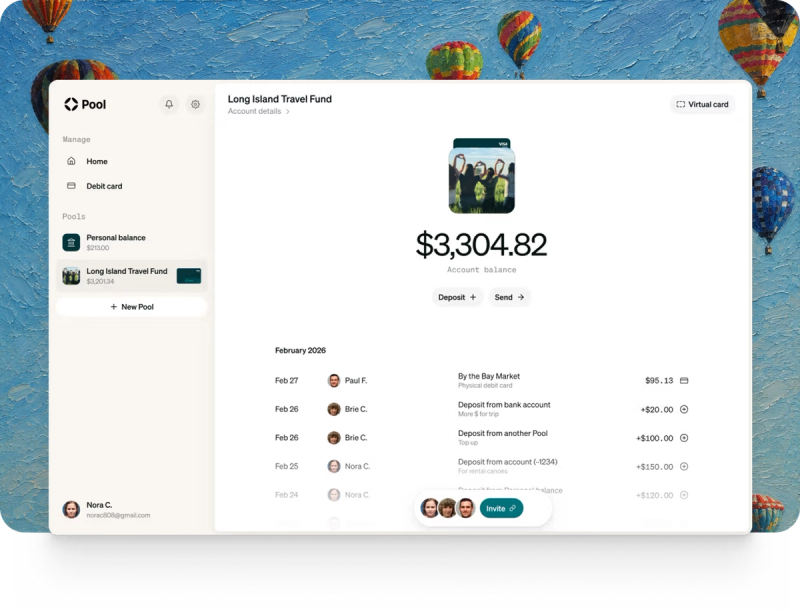
Pool works differently from Splitwise, Splid, Tricount, and Splittr. A Pool is a financial account with its own purpose, so the trip gets a balance of its own instead of a list of debts.
Everyone puts their share in before you leave, by bank transfer or debit card, or through a Pool Link you send to the people who haven't paid yet. Then everyone spends from the same balance.
Each member gets a free Visa debit card that works with any Pool where they're a Spender or Admin. Whoever sets up the Pool invites members and assigns each one a role. Admins have the same capabilities as the Owner, a Spender can add money, move it out, and spend with a debit card, and a Viewer can only view members and transactions.
Every purchase shows up in the Pool's activity feed. There's nothing to log afterward and nobody to chase, and nobody ends up holding everyone else's money in their personal checking account.
It's free to start a Pool, invite people, fund it, and use virtual and physical debit cards. Pool charges a clearly labeled fee only on opt-in transactions such as Instant Transfers.
Best for: trips with a high shared cost up front, like a rental or a cabin deposit, and trips you take with the same people every year, like a lake house week or an annual ski trip.
Where it falls short: every member verifies their identity when they join, so set it up a few days before you book. A Pool is also a US dollar account, so it won't convert expenses between currencies the way Splid or Splittr does.
2. Splitwise
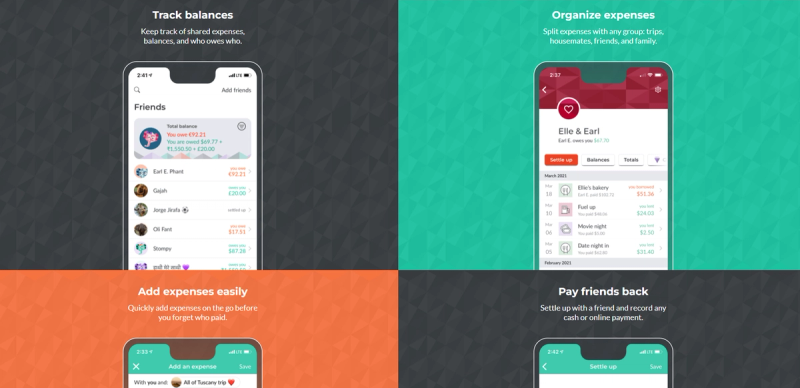
Splitwise is the app most people mean when they say they'll settle up later. Its biggest advantage is that half your friends already have it installed, so there's no convincing anyone.
It keeps a running balance for the trip, simplifies debts so fewer payments change hands at the end, and lets you add expenses offline and sync them when you're back on Wi-Fi.
The free plan has limits. Splitwise’s free plan has a daily expense limit and currency conversion and receipt scanning sit behind Pro, which starts at $4.99 a month in the US App Store.
Best for: friends who already use Splitwise and want one balance for the trip with a single settle-up at the end.
Where it falls short: someone still fronts the high costs and waits to be paid back, and a full travel day can hit the free cap before dinner.
3. Splid
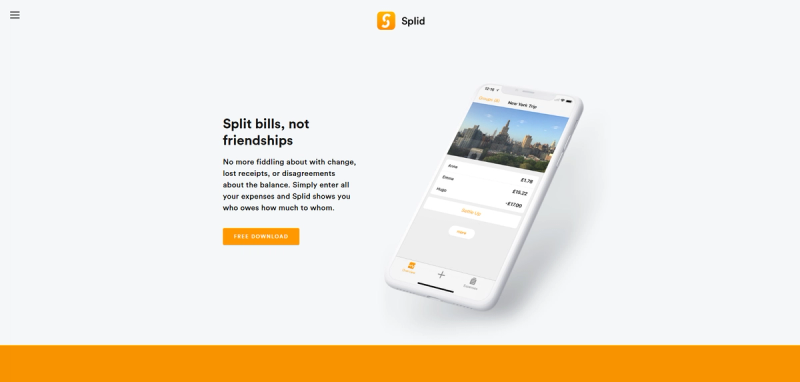
Splid is built for the trip where nobody wants to make another account. You start a trip, share it, and friends join without signing up.
It supports more than 150 currencies with automatic conversion and works fully offline, which matters on a ferry or a mountain road with no signal.
One trip is free. Unlimited trips and spreadsheet export cost a one-time fee of about $3.69, with no subscription.
Best for: a single trip abroad with friends who won't all download and register for something new.
Where it falls short: it's mobile only with no browser version and it only tells you who owes what without moving any money.
4. Tricount

Tricount is the best choice if you want a tracker that costs nothing. It dropped its in-app purchases, so every core feature is free, with no caps and no intrusive ads.
Everyone can add expenses on the go; it handles multiple currencies, and friends can take part without paying for anything.
Best for: budget-conscious friends who want unlimited tracking for free.
Where it falls short: entry is still manual, and settling up still happens after the trip, one transfer at a time.
5. Splittr
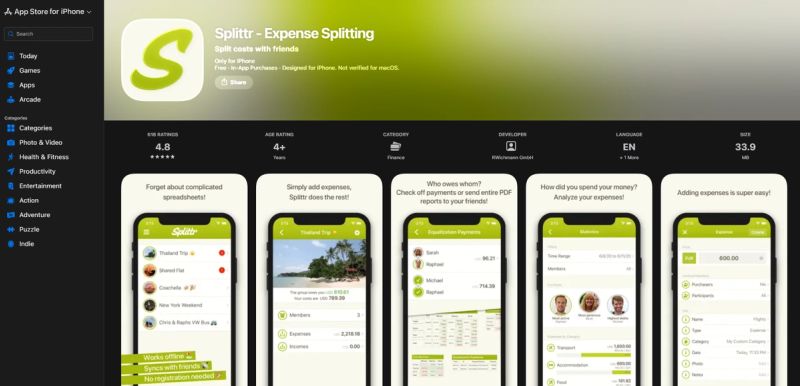
Splittr is an offline-first tracker built with long international trips in mind. It manages complicated uneven splits, converts currencies, and exports clear summaries once you're home.
The free version shows ads that can get in the way when you're adding an expense quickly. Removing them costs $0.99 a month, $4.99 a year, or $14.99 once.
Best for: long trips across several countries where people pay different shares of different things.
Where it falls short: the ads on the free version, and the same settle-up step at the end as every other tracker.
Why Tracking Apps Still Leave One Person Paying
Every expense tracker does the same core job. It records that you paid $1,400 for the rental and tells four friends they each owe you $280.
Tracking apps are starting to let you move money to settle up. But, you’re still likely carrying the charge until the transfers arrive. And, you're still the one sending the reminder when they don't.
Pool lets the group fund shared costs before anyone books. Funding first flips that order. When everyone pays their share into the trip's account before booking, the rental comes out of money that's already there, and the ledger is the account itself.
It's the same idea behind a travel fund, applied to one trip at a time.
How a Pool Works for a Trip
Use the trip’s destination to name the Pool, invite everyone coming, and decide who can spend and who can only view the balance.
You can make as many Pools as you need, so the ski trip never mixes with the vacation house fund.
Everyone pays their share in before anyone books, or you send a Pool Link to whoever hasn't paid yet. The rental, groceries, and gas then come straight off the Pool cards, and each purchase shows up in the activity feed.
Money left at the end can go back to everyone's bank or roll into the next trip. For a road trip you repeat every summer, many people just leave it in place.
For more detail, Pool's guides on splitting travel expenses and vacation finances go step by step, and a trip budget makes the number everyone pays easy to agree on.
Which App Fits Your Trip?
| Your trip | Best fit | Why |
|---|---|---|
| A high shared cost that nobody wants to front | Pool | Everyone funds the trip first and spends from one balance |
| The same trip with the same people every year | Pool | The account stays open between trips, so nobody resets the math |
| A weekend away with friends who already use Splitwise | Splitwise | Nobody has to install anything new, and the free plan covers a light weekend |
| One trip abroad with people who won't sign up | Splid | No accounts, offline use, and automatic currency conversion |
| Several weeks across several countries | Splittr | Offline-first with uneven splits and exportable summaries |
Planning something with a celebration attached, like a bachelorette party or a girls' trip, usually means a large deposit months ahead. That's where funding first saves the most awkward messages.
FAQs About Apps to Split Travel Expenses
What Is the Best App to Split Travel Expenses?
It depends on how you want to handle the money. If nobody wants to front the costs, a Pool gives the trip its own account that everyone funds first.
What's the Best App to Split Travel Expenses With Friends?
It depends on whether you want to settle up after the trip or pay together before it. Splitwise, Splid, and Tricount handle the first. A Pool handles the second, since everyone funds the trip up front and spends from one balance.
Who can use Pool for travel expenses?
To open or join a Pool, you must be at least 18, live in the United States, and be a U.S. citizen or resident alien with a valid Social Security number or taxpayer identification number. Identity verification and other eligibility requirements apply.
Is There a Free App to Split Travel Expenses?
Yes. Tricount is free with no caps or in-app purchases, Splid is free for one trip, and Splitwise has a free plan with a daily expense limit. Pool is free to start with no monthly fees, and charges only for opt-in transactions like Instant Transfers. Please note, network fees can also apply to foreign currency and cross-border card transactions.
Which Travel Expense App Works Offline?
Splid, Tricount, and Splittr all work offline, and Splitwise lets you add expenses offline and syncs them later. Splid and Splittr also convert currencies, which helps most on trips abroad. With Pool, you can pay in person with your physical Pool card or a supported digital wallet without cellular service or Wi-Fi. Set up your wallet beforehand and make sure your Pool has enough available funds. Normal card and wallet limits still apply.
How Do You Split Travel Expenses Fairly When People Spend Different Amounts?
Use uneven splits for anything that isn't shared equally, like one person's flight or a dinner someone skipped. Splittr and Splitwise both handle uneven shares well. With a Pool, cover the shared costs from the balance and let people pay for personal extras on their own cards.
Can You Use Pool for a One-Time Trip?
Yes. A Pool works well for a single trip, especially one with a high shared cost up front like a rental deposit, because nobody has to front it. Every member verifies their identity when they join, so set it up a few days before you book.
Is Pool a Bank?
No. Pool is a financial technology company, not a bank. Banking services are provided by First Internet Bank, Member FDIC, and the Pool Visa debit card is issued by First Internet Bank.
Create a Pool for Your Next Trip
If you're tired of being the one who fronts the rental and chases the transfers, give the trip its own account.
Shared purchases come from the funded balance, so there’s no need for reimbursements after the trip.